
Drill Blocks for Dumpling Squishy Guides Hub
First hour, controls, drill loop, rebirth, zones, and rarity — one map for the live tycoon.
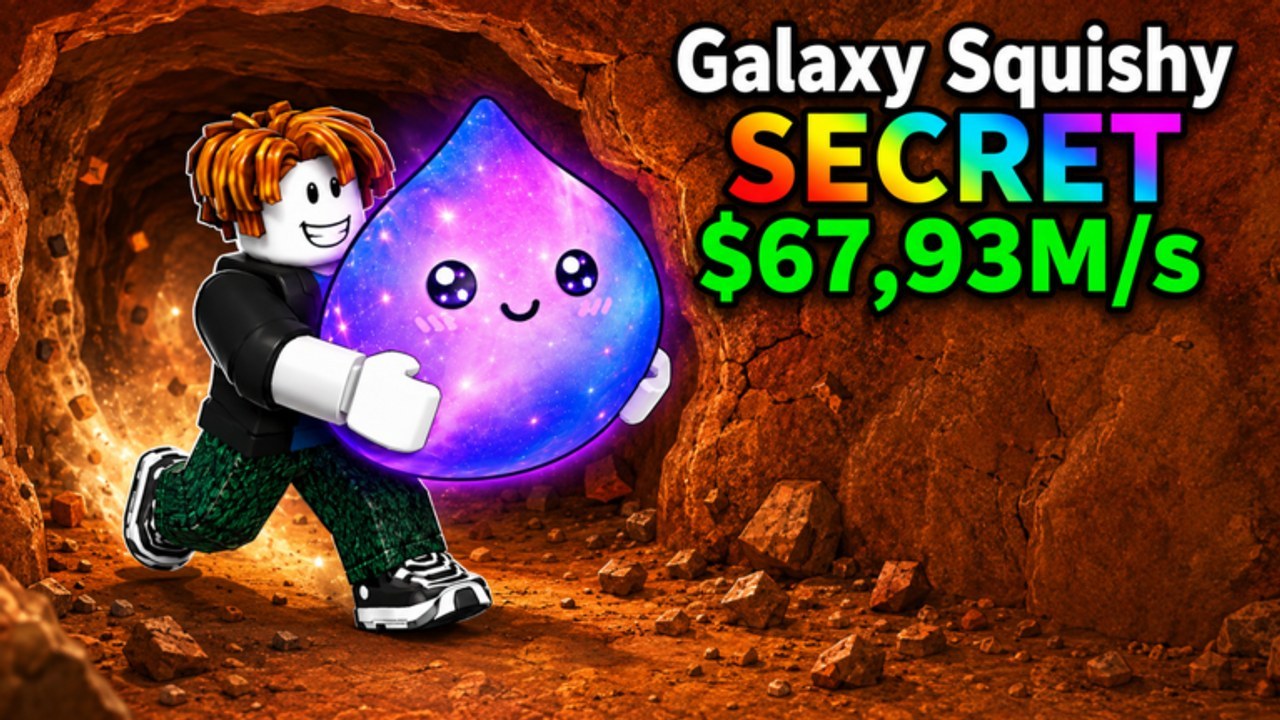
Drill Blocks for Dumpling Squishy is a live Roblox simulation tycoon from the CRAZY SQUISHY DUMPLING group. You hold a physical drill, push into block walls inside a dirt-and-grass pit, collect dumpling-blob squishies, park them on your plot, and spend the cash they print on stronger generators and a stronger drill. Later walls and later rarities sit behind that loop. This hub is the strategy map for it. Exact drill names, wall names, and drop names live on the client and change with updates, so treat in-game labels as the source of truth and these pages as the decision layer.
If you just spawned, do not open six tabs. Start with Getting Started for the first-hour order of operations, then How to Play if movement, camera, or placing still feels clumsy. Everything else on this page is optional until a squishy is sitting on your plot and cash has ticked once.
First hour and the drill loop
The beginner path is join, like, drill, place, collect. Getting Started keeps that order so you do not buy a second common before the first one is printing. It also covers the CRAZY SQUISHY DUMPLING group join, the like-the-game prompt, and the moment a first drill upgrade is actually cheaper than another weak drop.
How to Play is the session-loop and etiquette page. The dedicated controls guide is the keybind layer: WASD or left stick into blocks, camera, jump, interact/place, mobile versus PC versus gamepad. Read those two if you keep missing pickups or if you are playing on a phone with a virtual stick.
Power, zones, and rarity
Cash only matters if it buys a wall you could not break five minutes ago. Drill Power is the spend page: another squishy versus the next drill, and what a sticky wall is trying to tell you. Rebirth is the reset page — confirm the HUD button, read the tooltip, and never reset a first-hour plot. This wiki will not invent strength numbers. If a shop row lists a power value, use that row, not a screenshot from last week.
Zones is the map page. The early pit is blocky dirt and grass. Later walls are the reason you upgrade. Farming a cleared starter face after your drill already punches through it is the most common stall in this genre. Five players in one server make that stall worse, because a popular face gets vacuumed while a quieter lane still has blocks.
Rare Squishies covers the common → uncommon → rare → epic → legendary → secret ladder in generic language. Official art advertises a Secret Galaxy Squishy at a huge cash-per-second number. Treat that thumbnail as a high-rarity billboard, not a drop table. Names of specific blobs appear on the client; they are not frozen here.
Pair the guides with the other hubs
Guides tell you what to do. The rest of the wiki tells you what to spend on and what changed overnight:
- Codes — as of 7 September 2026 there is no independently verified public promo list. Still join the group and learn the redeem button so you are ready.
- Tier List — keep-or-sell thinking for drills and rarities without fake item names.
- Players — plot layout, collection paths, and mutations if the client shows them.
- Updates — why a wall, a shop row, or a rarity weight might feel different today.
- Scripts — only if you are going to look them up anyway; start at safety, not at an executor ad.
- Tools — session checklists and a progression planner when the shop has too many buttons.
Open those hubs after the matching guide. A script page without script safety is how accounts get moderated.
How to use this hub after a patch
The experience launched on 7 August 2026 and was still receiving updates in early September 2026. When a patch lands, do not reread every guide. Check patch notes for what actually changed, then jump to the one page that matches the change: drill shop → Drill Power, new wall → Zones, new blob art → Rare Squishies. If the patch is a like-milestone or a group shout, go to group rewards instead of guessing a code.
Keep one rule across every page on this hub: if the client and the wiki disagree, the client wins. We describe the loop, the five-player constraint, and the spend order. We do not freeze a shop that LockedInGamesR can edit overnight.
Suggested reading order
- Getting Started — first hour, group join, first upgrade.
- How to Play — session loop, plot collection, server manners.
- Controls — WASD, mobile stick, gamepad, interact, hotbar.
- Drill Power — when the wall is the bottleneck.
- Zones — stop farming empty dirt.
- Rare Squishies — luck versus raw power, Secret rarity as a goal.
- Rebirth — only after the HUD shows a labelled reset and the plot is worth rebuilding.
- Plot setup — make the generators easy to collect while you are in the mine.
This hub is a session map, not a novel. After each update, pick one child page that matches the new shop row or the new wall, run that loop, then close the wiki and go back to the pit. The guides stay useful only while they send you into a wall that still has blocks on it.
Frequently Asked Questions
Quick answers players ask after every drill session.
Which guide should I open first?
New players start at Getting Started. If movement or placing already feels wrong, jump to How to Play or the controls guide.
Do I need codes before I drill?
No. As of 7 September 2026 we have not independently verified a public promo list. Like the game, join the group via group rewards, and keep Codes bookmarked.
Should I use scripts while learning the loop?
Learn to drill, place, and collect first. If you still look up automation, read script safety and the scripts hub before touching an executor.
What is the Secret Galaxy Squishy on the art?
Official thumbnails advertise a Secret Galaxy Squishy at a huge cash-per-second figure. Treat it as a high-rarity goal, then read Rare Squishies and the tier list.
Where do plot layout and mutations live?
Plot lanes and collection paths are on plot setup. Mutation checks live on mutations. Both sit under the players hub.